Calculate a Weighted Average
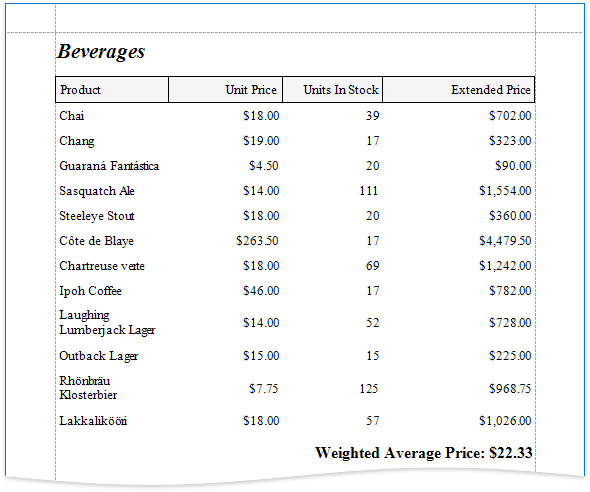
Follow the steps below to calculate a weighted average:
- Open an existing report or create a new one from scratch.
- Bind a report to a required data source.
-
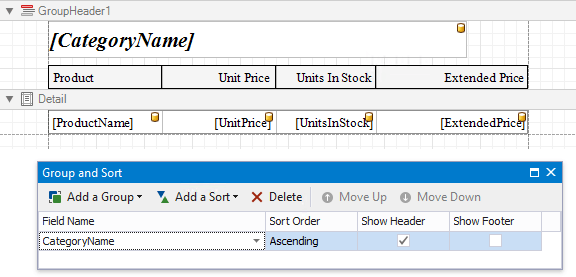
Group the report's data using the Group and Sort Panel and construct a layout like the following:
-
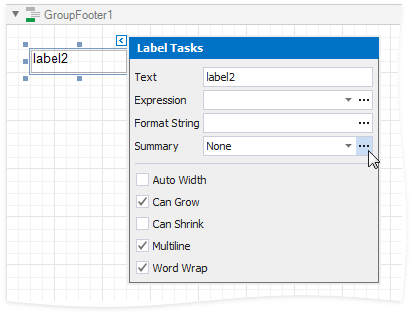
Add the Group Footer band to the report and drop a Label control on this band to display the summary result. Click the label's smart tag, then click the Summary field's ellipsis button.
-
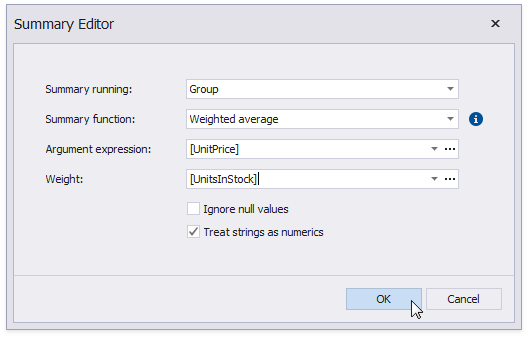
In the invoked Summary Editor window:
- Set the Summary Running property to Group.
- Set the Summary Function property to Weighed average.
- Set the Argument Expression property to the field to count the weighted average on, and the Weight property to the field that provides weights.
-
You can also use the control's Format String property to format the summary value. For instance, set this property to Weighted Average Price: {0:c2}.